 America needs believers who take action.
FlashPoint Chapters – User Guide
Welcome to Flashpoint Chapters! This guide will help you navigate your account, access training, and troubleshoot common issues.
We sincerely appreciate your patience and support as leadership teams and chapters continue being developed and activated nationwide.
Account Access & First Login
When you receive your account access email, it will include:
- Your username/email address
- Your default password
Important Login Tips
- Use the same email address as your username
- Double-check that there are no extra spaces before or after your email address
- Enter the default password exactly as provided
- Passwords are case-sensitive
- Avoid copying and pasting your password, as some browsers may accidentally copy hidden spaces or formatting
Account Password Reset
If you’re unable to log into your account, you can reset your password at any time:
- Select “Forgot Password” on the login page
- Enter the email address associated with your account
- Check your inbox for a password reset email
- Follow the instructions to create a new password
If you do not receive the email within a few minutes, please check your spam or junk folder.
NOTE:
Currently we are launching FP Army Chapters in USA only. Our Command Center is available for US residents only at this time. If you used an overseas address, you will not receive the reset password at this time. We will announce when international chapters become available.
….
Training Video Overview
Your 1st training program consists of 9 lessons designed to equip you.
How Lesson Unlocking Works
- Lessons are released one at a time
- Each new lesson unlocks automatically after you complete the previous lesson
- This ensures everyone progresses through the training in the correct order
Pausing & Resuming Training
Need to take a break? No problem.
- You may pause a lesson at any time
- When you return, simply refresh your screen
- The system will ask whether you want to:
- Resume where you left off, or
- Start the lesson from the beginning
This allows you to complete training at your own pace.
…….
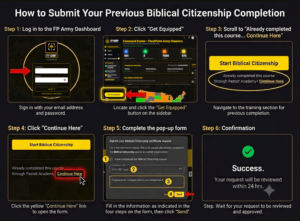
Completed Biblical Citizenship previously?
If you have previously taken and completed the Biblical Citizenship Class through other organization, follow these steps:
1. Click on the “Get Equipped” button located in the bottom-left corner of the Command Center (see image guide).
2. Scroll down until you find: “Already completed this course through Patriot Academy? Continue Here” located underneath the Start Biblical Citizenship button.
3. Click the “Continue Here” link.
4. A pop-up window will appear where you need to:
- Check the box confirming: “I have completed Biblical Citizenship Course”
- Add your training completion date
- Add the name of training location
5. Submit your information for approval.
Once approved, your completion will be reflected in your Journey Progress. Approvals may take up to 24 hrs.
NOTE: If you have already completed the Biblical Citizenship Course through the FlashPoint Army Command Center, this function will not be visible to you. Your completion has already been recorded, and no additional submission is needed.
______________
Need Additional Help?
If you experience technical issues or need support accessing your training, please contact the Flashpoint Chapters support team at info@fparmychapters.com